Recommended architecture
Vade Cloud™ performs message analysis outside your network so that it delivers only clean email traffic on your firewall.
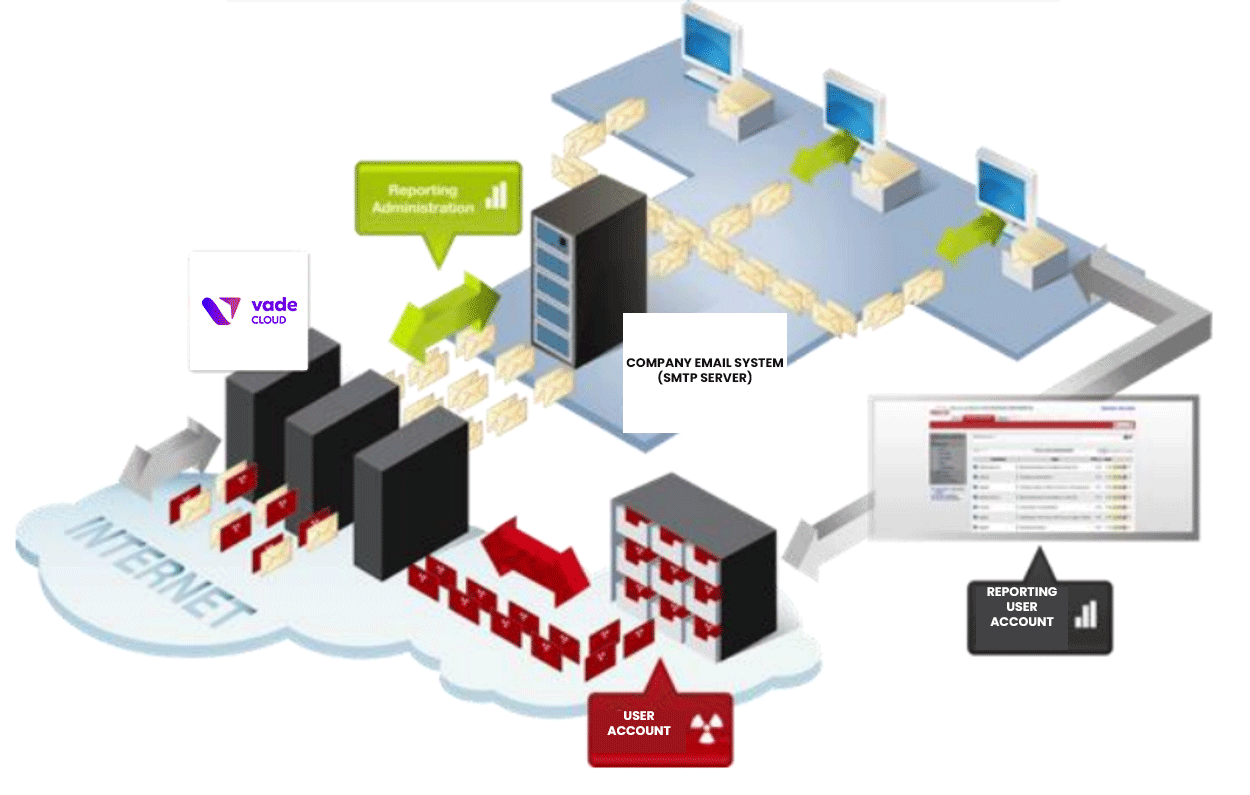
MX Setup
In order for Vade Cloud™ to receive emails, the MX fields have to be configured as indicated below:
| MX | Weight |
|---|---|
| mx01.cloud.vadesecure.com | 10 |
| mx02.cloud.vadesecure.com | 10 |
| mx03.cloud.vadesecure.com | 10 |
| mx04.cloud.vadesecure.com | 10 |
Tip: Using extra MX records, in addition to the ones listed above (for
backup/failover purpose for instance), will result in spam emails bypassing the filtering
platform.
Attention: Some DNS hosts require to add a dot at the end of the field in case of
absolute notation.
Firewall Rules & Network Access
In order to secure access to the platform, Vade recommends restricting access to port 25 on your firewall to Vade Cloud™ only. As such, you will ensure that no email traffic can bypass the email protection solution.
To do so, authorize the following sub-networks in your firewall configuration for
inbound flow:
| Vade Cloud™ IPs | Destination servers | Ports | Comments |
|---|---|---|---|
|
Email server |
|
French hosters only |
| LDAP server |
|
Authorize if user LDAP verification is activated |
If you are using Vade Cloud™ for outbound flow, add the following data in your firewall configuration:
| Sending server | Vade Cloud™ hostnames | Port | Comments |
|---|---|---|---|
| Email server |
|
|
To route directly to Vade Cloud™
IPs: |